
Every patrol round, proven — not promised
Guards scan a QR checkpoint, the app pins the GPS location and stamps the time, and photos can only come from the camera. What reaches your report is what actually happened on site.
%20Guard%20Patrol.webp)
i-Check is a guard patrol system for condominiums, housing estates and industrial sites, and part of GuardOS within The LivingOS platform. A guard scans a QR checkpoint, the app pins the GPS location and stamps the time automatically, and photo evidence can only be captured by the camera — so a patrol report records what actually happened on site rather than what was written up afterwards.
- Every checkpoint scan is GPS-pinned and time-stamped automatically.
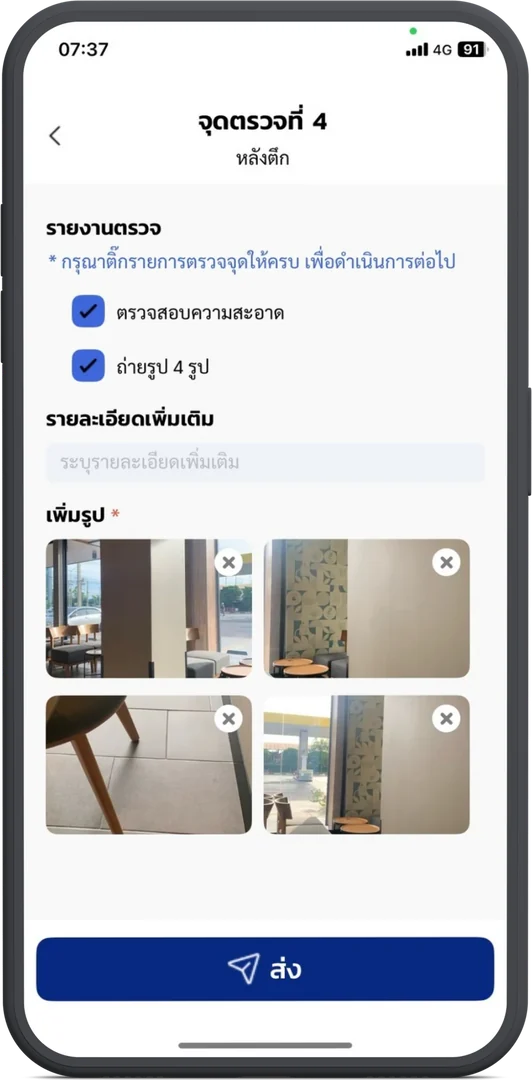
- Photos are camera-only, up to 4 per checkpoint — the phone gallery cannot be used.
- Keeps recording in signal dead zones and syncs when back online; reports are sent automatically to Telegram as PDF or Excel.
Everything a patrol round needs to stand up to scrutiny
From QR checkpoint scans and GPS route mapping to incident reports and automatic daily reporting — give the security team a round that records itself.
QR checkpoint scanning
Guards scan the QR code at each checkpoint to confirm they were there. The scan opens the checklist for that specific point.
Automatic GPS pinning
Each scan captures its GPS coordinates, and the points are joined into the route walked so you can see the path of the round on a map.
Camera-only photo evidence
Up to 4 photos per checkpoint, taken in the app. Pulling images from the phone gallery is blocked, so old photos cannot be reused.
Automatic time stamps
Every checkpoint records which point was checked and at exactly what time — no manual entry, nothing to edit after the fact.
Configurable patrol rounds
Set as many rounds a day as the site needs, each with its own start and end time. Rounds can be locked to a fixed checkpoint sequence.
Round-due alerts
The app alerts the guard when a round is due, and the alert can be switched on or off per site. Rounds are colour-coded as done, missed, or current.
Per-checkpoint checklists
Define what has to be inspected at each point — cleanliness, electrical equipment, lift operation — as tick-box items the guard completes before submitting.
Works offline
Patrols keep recording in stairwells, basements and other signal dead zones, then sync automatically once the device is back on the network.
Real-time Telegram notifications
Each completed checkpoint posts to your Telegram group as it happens — point name, time, GPS link and photos — so managers see the round live.
Automatic daily email reports
Patrol reports are emailed out on a schedule as PDF and Excel — detailed, summary, or missed-checkpoints-only.
Incident reporting
Guards file an incident from the same app with location, subject, reporter, details and photos — it reaches the juristic office and Telegram at once.
One year of patrol history
Rounds, times, GPS pins and photos are retained for a year and stay searchable, with an Excel/PDF/dashboard view of the results.
From QR sticker to signed-off report
The juristic office sets the round up once on the web. After that the round runs itself, and the record builds as the guard walks.
- Step 1
Set up checkpoints on the web
The juristic office names each checkpoint, lists what has to be inspected there, and generates the QR code to print and mount on site.
- Step 2
Schedule the rounds
Add as many rounds a day as the site needs, each with a start and end time, and choose whether checkpoints must be walked in sequence.
- Step 3
The guard walks and scans
The app alerts when a round is due. The guard scans each QR code, ticks the checklist, and takes up to 4 photos with the in-app camera.
- Step 4
Managers see it as it happens
Each checkpoint posts to Telegram in real time, and the daily PDF/Excel report lands by email — with a map of the route actually walked.
When something is wrong, it is reported the same minute
Heavy rain that stopped an outdoor round, a forced storeroom door, a fallen tree across the driveway — the guard files it from the app, and it does not sit in a paper logbook until morning.
Configured on the web, in minutes
Everything the round depends on is managed by the juristic office from Urbanice Niti — no vendor visit needed to change a checkpoint.
Checkpoints and QR codes
Name each checkpoint, list its inspection items, and generate a QR code ready to print and mount.
Patrol rounds
Set the number of rounds a day and the start and end time for each, and lock the walking sequence where it matters.
Scheduled reports
Choose detailed, summary, or missed-checkpoint reports and the recipients — delivered automatically as PDF and Excel.
History and dashboard
Review any round from the past year with its times, GPS route, checklist answers and photos.
Turn patrol rounds into verifiable records
- Prove a round happened with a GPS-pinned, time-stamped scan at every checkpoint
- See the actual route walked drawn on a map, checkpoint by checkpoint
- Trust the photo evidence — the camera is the only source, the gallery is blocked
- Spot a missed round immediately from the colour-coded round status
- Keep recording in basements and stairwells, and sync when signal returns
- Watch each checkpoint land in your Telegram group in real time
- Receive the daily patrol report by email as PDF and Excel, without asking
- Get incidents reported the minute they are found, with photos attached
- Go back through a full year of rounds, times, routes and images
Ready to see every patrol in real time?
Tell us about your site and we'll help you set up Guard Patrol (i-Check) for your team.
Frequently asked questions
What is Guard Patrol (i-Check)?
Guard Patrol (i-Check) is a guard patrol system for condominiums, housing estates and factories. Guards scan a QR code at each checkpoint on their round; the app records the GPS location, the exact time, a completed checklist and camera photos, and turns the round into a report the juristic office can verify.
How does checkpoint scanning work?
The juristic office generates a QR code per checkpoint from Urbanice Niti and prints it for mounting on site. When a guard scans it, the app confirms the guard was there, pins the GPS coordinates, stamps the time, and opens the inspection checklist defined for that point.
Can a guard fake a patrol with old photos?
No. Photos can only be taken through the app's camera at the checkpoint — up to 4 per point — and selecting an image from the phone gallery is blocked. Combined with the QR scan, the GPS pin and the automatic time stamp, each checkpoint has to be visited to be recorded.
Does it work where there is no mobile signal?
Yes. Basements, stairwells and other dead zones are common on patrol routes, so the app keeps recording offline and syncs the round automatically once the device is back on the network.
What happens if a guard misses a round?
The app alerts the guard when a round is due, and each round is colour-coded as completed, missed, or currently in progress. Missed checkpoints appear in the scheduled report, and a missed-checkpoints-only report can be sent to management.
What reports does i-Check produce?
Detailed patrol reports, summary reports and missed-checkpoint reports, all available as PDF and Excel and emailed to chosen recipients on a schedule. Results can also be reviewed on a dashboard, and every completed checkpoint posts to a Telegram group in real time.
Can the security team report incidents too?
Yes. Guards file an incident report from the same app with the location, subject, reporter, a description and up to 6 photos. It reaches the juristic office through Urbanice Niti or Guard Web and is pushed to the Telegram group at the same time.
How long is patrol data kept?
One year of history is retained — rounds, times, GPS routes, checklist answers and photos — so past patrols can be reviewed or exported when an incident needs investigating.