
Smart Gate
Barrier gate + LPR camera + Urbanice, working as one system. Registered vehicles drive straight through, visitors are handled at the guard post, and the juristic office sees every entry and exit.
.webp)
Smart Gate is an automated vehicle access system for condominiums and housing estates, and part of GuardOS within The LivingOS platform. A boom barrier, a licence-plate recognition (LPR) camera and the Urbanice app work as one system: registered vehicles drive straight through on the plate alone, visitors are handled at the guard post, and the juristic office sees a photographed, time-stamped record of every entry and exit.
- The barrier opens on the licence plate — no card or remote needed.
- Holds up to 100,000 plates on the allowlist and keeps working while offline.
- 4 MP cameras capture plates day and night, with entry and exit photos time-stamped and cross-checked on the way out.
Three parts, one gate
Smart Gate is not a standalone box. The barrier and the camera are wired into the same platform your juristic office, guards and residents already use.
Boom barrier gate
The physical barrier at the entrance and the exit lane, driven by the controller rather than by a guard pressing a button.
LPR camera
Reads the license plate as the vehicle approaches and decides whether the barrier should open, on its own if the network is down.
Urbanice platform
The Car Directory, resident notifications and the Niti and Guard web consoles that turn a gate movement into a record.
Everything a modern vehicle gate needs
From plate recognition to visitor pre-registration and audit-ready history — Smart Gate keeps every entry point secure and connected to The LivingOS platform.
Car Directory
Residents register their own vehicles in the Urbanice app — plate, vehicle type, brand, model, colour and photo — and the juristic office approves them.
Automatic License Plate Recognition (LPR)
Recognises the plate as the vehicle approaches and matches it against the approved Car Directory before the barrier moves.
Pre-register visitors
Residents register an expected visitor in advance with a date range, so the guard post already has the details when the vehicle arrives.
Notification and E-Stamp
The resident is notified the moment a visitor is logged, and can stamp the visitor's pass from the app to apply the parking rate.
Not my visitor
If the resident does not recognise the visitor, one tap flags it back to the guard team instead of a phone call.
Entry and exit photos with a timestamp
Every pass is captured with a timestamped photo of the vehicle, creating a record the juristic office can rely on in a dispute.
Cross-check on the way out
At the exit lane the pass is scanned and matched against the entry record, so a vehicle cannot leave on someone else's ticket.
Niti and Guard web consoles
Searchable entry and exit history, visitor volume by month and visitor mix by category, ready for the committee meeting.
For residents, owners and tenants
A registered vehicle never stops at the guard post. The Car Directory does the work the guard used to do by hand.
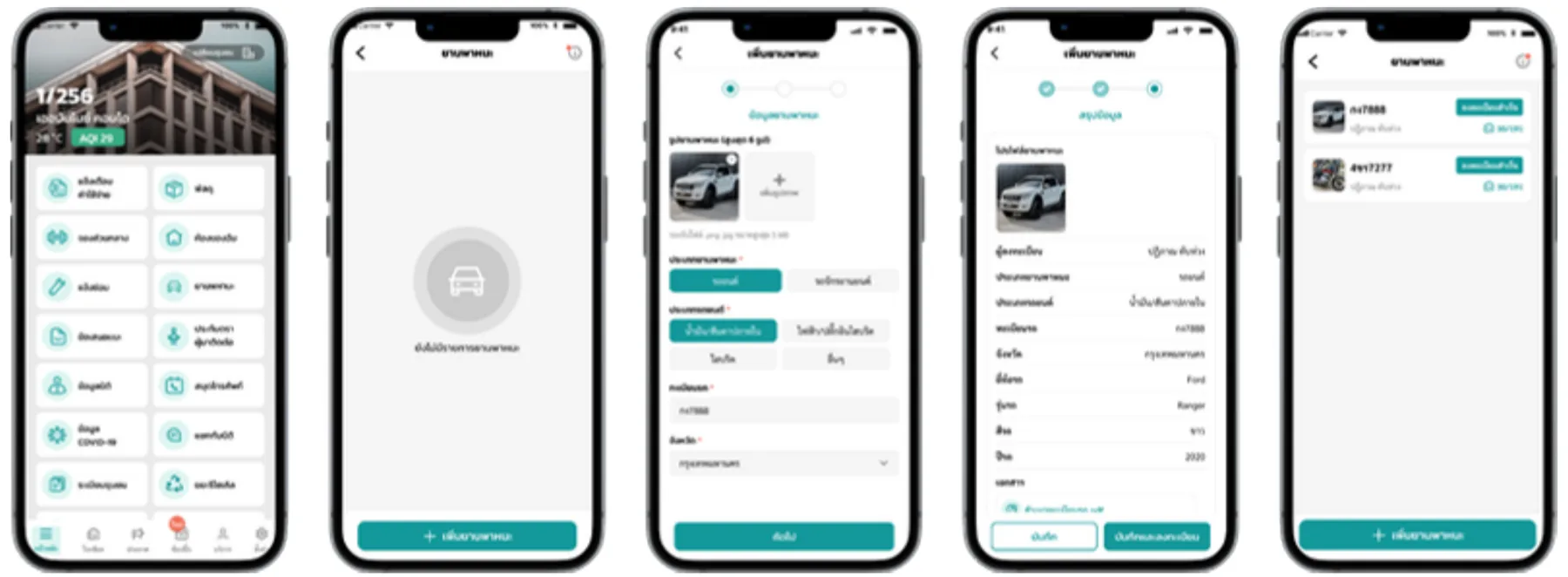
Register the vehicle once
The resident adds the vehicle in the Urbanice app and the juristic office approves it into the Car Directory.
Entrance
The LPR camera reads the plate on approach, matches it against the directory and opens the barrier automatically.
Exit
The exit lane reads the plate the same way and closes off the movement, leaving a complete in-and-out record.
For visitors, on i-Pass
Visitor vehicles are handled by i-Pass at the guard post, then cross-checked against the same gate record on the way out.
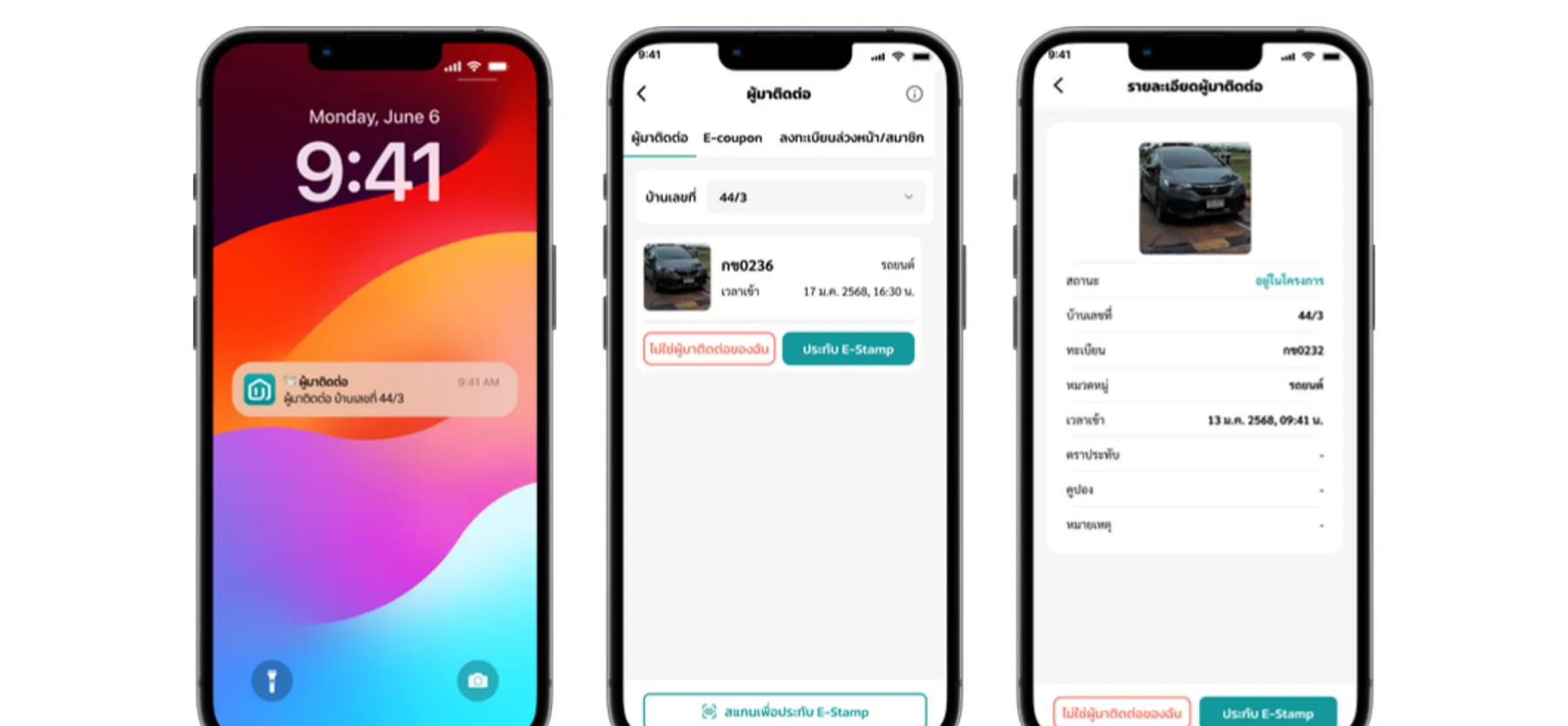
Step 1 — Entrance
The guard records the plate, the unit number and the visitor category on the handheld, photographs the ID with a PDPA watermark, and prints a pass carrying a QR code.
Step 2 — The resident is notified
The visit appears in the resident's app straight away. They can apply an E-Stamp for the parking rate, or flag it as not their visitor.
Step 3 — Exit
The guard scans the pass at the exit lane. The system cross-checks it against the entry record and calculates the parking fee from the stamp.
The equipment at the gate
Supplied and installed as part of the solution, sized to the number of lanes at your project. The specs below are a typical configuration — we match the models to your site survey and budget.
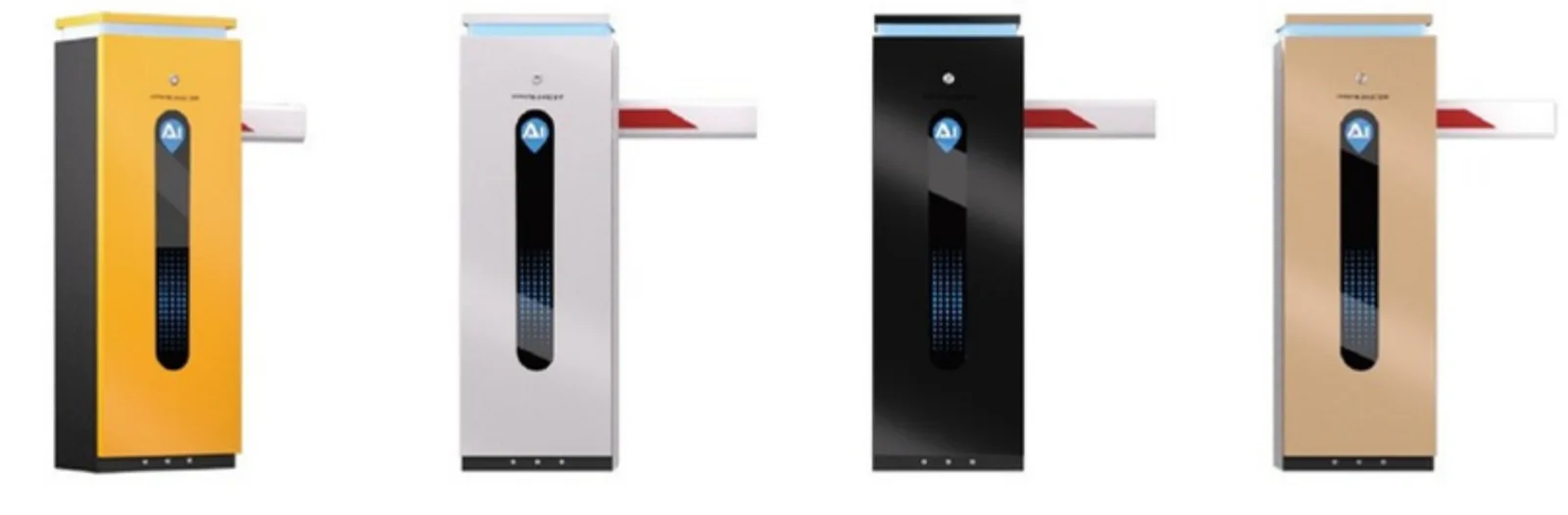
LPR camera
- 4 MP real-time video with a motorised vari-focal lens
- Built-in white light and IR LEDs for night capture
- Loop, radar and video triggering; Wiegand and access control support
- Vehicle type, colour and brand recognition alongside the plate
- 100,000-entry allowlist and blocklist with offline gate control
Boom barrier gate
- Pole length 1–6 m, operating speed 0.8–6 s
- AC220V supply, 150 W motor, DC24V rated
- IP65, −40°C to 80°C, 1.4 mm high-strength steel chassis
- Service life over 5 million cycles; remote control from 30 m or more
Gate controller and network
- Interface monitoring controller linking the cameras to the barriers
- 8-port PoE switch feeding the camera lanes
- WiFi router for the link back to The LivingOS
- Separate IN and OUT lanes for cars and motorcycles
Indicative specifications, not a fixed bill of materials. Typical layout: one barrier and one LPR camera per lane, per direction.
Secure every entry point, without slowing residents down
- Registered vehicles pass without stopping — no card, no remote, no queue at peak hours
- The guard team stops copying plates by hand and watches the exceptions instead
- Every movement carries a timestamped photo, so disputes are settled from the record
- Visitor vehicles are tied to a resident and a unit, not to a paper logbook
- Parking fees follow the E-Stamp rules the juristic office configures
- ID photos are watermarked, keeping visitor data handling in line with PDPA
- The gate keeps deciding from its local allowlist even if the network drops
Ready to secure your vehicle entry points?
Tell us about your project and we'll size a Smart Gate installation for your lanes.
Frequently asked questions
What is Smart Gate?
Smart Gate combines a boom barrier, a license plate recognition camera and the Urbanice platform into one vehicle access system. Registered resident vehicles pass automatically on their plate, visitor vehicles are handled at the guard post through i-Pass, and every movement is recorded for the juristic office.
How does a resident register a vehicle?
In the Urbanice app the resident adds the vehicle — plate, type, brand, model, colour and a photo — and the juristic office approves it into the Car Directory. Once approved, the plate opens the barrier at the entrance and the exit.
What happens when a vehicle that is not in the Car Directory arrives?
It is treated as a visitor. The guard records it on the handheld through i-Pass, the resident is notified in the app, and the visitor receives a pass with a QR code that is cross-checked on the way out.
Does the gate still work if the internet goes down?
Yes. The LPR camera holds an allowlist and blocklist of up to 100,000 plates locally and can control the barrier offline, so registered vehicles keep passing while the link is restored.
Can Smart Gate calculate parking fees?
Yes. The visitor pass carries the parking conditions the juristic office configures, and the resident's E-Stamp from the app applies the free-hours rule. The fee is calculated when the pass is scanned at the exit lane.
Is visitor data handled in line with PDPA?
The ID photo captured at the guard post is watermarked, visitor records are tied to the visit rather than kept loose on the device, and access to the history is controlled through the Niti and Guard web consoles.
How is Smart Gate different from i-Pass?
i-Pass handles people arriving at the guard post — registration, the printed pass and the resident notification. Smart Gate handles the vehicle lane — the barrier and the plate recognition. They are usually deployed together, with i-Pass covering visitors and Smart Gate covering registered vehicles.